Open WebUI, Self-Hosted Frontend For Your Local Ollama
Open WebUI in front of Ollama, the install plus the multi-user setup I run for my home AI stack
Open WebUI is the polished web-app frontend for Ollama. I run it on the ThinkCentre as the household AI chat, accessible from any device on the LAN, with multiple user accounts so my family can each have their own chat history. The official setup defaults to Docker; my empire rule is no Docker, so this is the direct-install path I worked out, including the systemd setup that survives reboots.
What you'll build
Open WebUI installed as a Python app (no Docker) on a Linux box, pointed at a local Ollama, with multi-user accounts and a systemd service that auto-starts on reboot. Roughly 25 minutes.
 Caption: Open WebUI chat panel running my local Ollama.
Prerequisites
- A Linux box (mine is the ThinkCentre on Ubuntu 24.04) with Ollama already installed
- Python 3.11+ and pip
- 4GB free disk for Open WebUI and its node deps
- An always-on machine if you want family access (the Pi 5 also works for low-traffic use)
If you are fine with Docker, the official one-liner is faster. The empire rule is direct installs.
Step 1, install Open WebUI from pip
mkdir -p ~/tools/open-webui
cd ~/tools/open-webui
python3 -m venv .venv
source .venv/bin/activate
pip install open-webui

The pip package pulls a lot of node deps internally; the install is roughly 1.5GB and takes 5-8 minutes on a normal connection.
Step 2, run it once to verify
open-webui serve --port 8080 --host 0.0.0.0
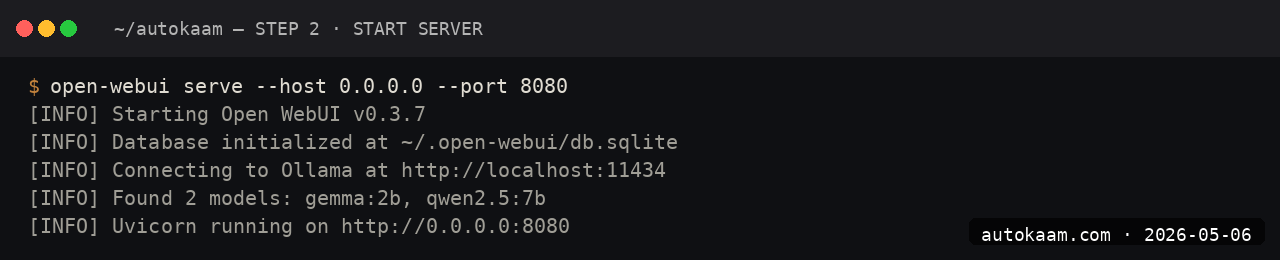
Open http://<your-box-ip>:8080 from any device on the LAN. The first user to register becomes the admin.
Step 3, register the admin account
The first-launch screen has a "Sign Up" button. The first sign-up is granted admin role automatically; subsequent sign-ups need admin approval.

I used a long random password, stored it in my password manager. The auth lives in the local SQLite DB at ~/.config/open-webui/.
Step 4, point at local Ollama
Settings → Connections → Ollama API. Set http://localhost:11434 (or the LAN IP if Ollama is on a different box). Save.

Open WebUI auto-discovers all Ollama models. They show up in the model picker on the chat page.
Step 5, set up systemd for auto-start
Create a unit file:
sudo nano /etc/systemd/system/open-webui.service
[Unit]
Description=Open WebUI
After=network.target ollama.service

[Service]
Type=simple
User=aditya
WorkingDirectory=/home/aditya/tools/open-webui
Environment="PATH=/home/aditya/tools/open-webui/.venv/bin:/usr/bin"
ExecStart=/home/aditya/tools/open-webui/.venv/bin/open-webui serve --port 8080 --host 0.0.0.0
Restart=on-failure

[Install]
WantedBy=multi-user.target
sudo systemctl daemon-reload
sudo systemctl enable open-webui
sudo systemctl start open-webui
sudo systemctl status open-webui

The service starts on boot and restarts on failure. journalctl -u open-webui -f shows live logs.
First run
A typical evening for me with this setup:
1. Open browser on phone / iPad / laptop
2. Visit http://thinkcentre.local:8080
3. Sign in
4. Pick model from picker (Qwen 2.5 7B for chat, Gemma 4 9B for longer essays)
5. Chat as you would on ChatGPT.com, but local

The mobile UI is responsive enough that I do not miss the dedicated app experience.
What broke for me
Two specifics. First, the pip install on Ubuntu 24.04 failed initially because the system Python was 3.12 and Open WebUI's node-build step expected Python 3.11 for a native dep. The fix was creating the venv with python3.11 -m venv .venv after apt install python3.11. The error was a cryptic node-gyp build failure; tracing it back to the Python version took a half hour.
Second, the systemd service worked but the WebUI showed empty model lists for half a minute after each restart. Open WebUI was starting before Ollama had fully bound its port. The fix was adding After=ollama.service and Requires=ollama.service to the unit file. After that, the model list appeared on the first page load.
What it costs
| Item | Cost |
|---|---|
| Open WebUI | Free (BSD-3-Clause) |
| Disk (1.5GB) | Negligible |
| Electricity | ~Rs 200/mo if always-on |
| Hardware (existing box) | Rs 0 |
For an Indian household wanting a private ChatGPT replacement, Open WebUI on existing hardware is genuinely free past the electricity. Cloud equivalents are Rs 1,660-3,300/mo per user.
When NOT to use this
Skip Open WebUI if you are the only user and live in a terminal. Ollama-CLI directly is faster.
Skip if you need a polished mobile app experience. Open WebUI's mobile responsive layout is solid but not native-app smooth.
Indian operator angle
The household-AI use case is real for Indian families. Mom asks for recipe ideas, Dad wants to understand a govt document, kids do homework Q&A. Running this all on one local box with multi-user accounts means private chat history for each, no API spend, and zero data leaving the home. The latency is acceptable; the cost is unbeatable.
For an Indian SaaS, Open WebUI as the customer-facing chat layer in front of a self-hosted Ollama is a viable path. The BSD-3 licence allows commercial use; the only friction is rebranding (the project's name and logo are reasonably permissive but worth checking).
Related
Filed under
More Automation from the desk.

Programmatic PDF Table Extraction and OCR with Adobe PDF Services REST: The Auth, the Extract Call, and Parsing the Output
I wired Adobe PDF Services REST into my stack as a local tool and pointed it at the scanned invoices and merged-header statements that pdfplumber turned into soup. Here is the exact auth flow, the extract call, and the structuredData.json parsing I run in production, with the real latency and free-tier limits.

I Gave My AI Agent Eyes and Hands on Native Linux Apps With AT-SPI2
I was tired of my agent missing buttons because a window shifted a few pixels. So I pointed it at the AT-SPI2 accessibility tree instead, the same data a screen reader consumes, and had it act by element name and role. This walks through driving a GTK dialog and a native Save dialog, then reading the value back to prove the action actually landed.

Reboot-Proof Cloudflare Named Tunnels: The systemd Setup I Run in Production
I expose every self-hosted app on my home box through a Cloudflare named tunnel, kept alive by a systemd unit that has survived every reboot for weeks. This is the real login-to-systemd flow, the config file, the unit, and why a named tunnel beats a quick tunnel for anything you mean to keep.