Cloudflare Workers AI, Edge Inference Without Your Own GPU
Workers AI for Llama 3 and SDXL inference at the edge, the setup I tried for a low-latency client demo
Cloudflare Workers AI runs open-source models (Llama, Mistral, SDXL, Whisper, embeddings) at Cloudflare's edge with sub-second latency from Indian users. I tried it for a client demo where round-trip latency was the constraint. The dev experience is solid; the rate limits are tighter than the docs suggest. This is the setup that worked plus the bit that bit me.
What you'll build
A Cloudflare Worker that calls Workers AI's Llama 3 inference, deployed via Wrangler, with a working API endpoint. Roughly 20 minutes.
 Caption: Cloudflare Worker calling Llama 3 8B at the edge, responding in under 400ms.
Prerequisites
- Cloudflare account with Workers enabled (free tier is fine to start)
- Node 20+ and the Wrangler CLI
- Basic JavaScript familiarity
- A Cloudflare API token if you want CI/CD
If you do not have a Cloudflare account, sign up; the free tier covers everything in this tutorial.
Step 1, install Wrangler
sudo npm install -g wrangler
wrangler --version
wrangler login

The login opens a browser, authenticates against your Cloudflare account, returns a token to Wrangler. The token persists in ~/.wrangler/.
Step 2, scaffold a Worker
wrangler init my-ai-worker
cd my-ai-worker

Pick "Hello World" template. Wrangler creates src/index.ts and wrangler.toml.
Step 3, enable Workers AI binding
Edit wrangler.toml:
name = "my-ai-worker"
main = "src/index.ts"
compatibility_date = "2026-05-01"

[ai]
binding = "AI"

The binding name AI is what your Worker code references; the actual model is picked per-call.
Step 4, write the Worker
Replace src/index.ts:
export interface Env {
  AI: Ai;
}

export default {
  async fetch(request: Request, env: Env): Promise<Response> {
    if (request.method !== 'POST') return new Response('POST only', { status: 405 });

    const { message } = await request.json<{ message: string }>();

    const response = await env.AI.run('@cf/meta/llama-3.1-8b-instruct', {
      messages: [
        { role: 'system', content: 'You are concise. Reply in two sentences.' },
        { role: 'user', content: message },
      ],
    });

    return Response.json({ reply: response.response });
  },
};

The env.AI.run call routes to whatever Cloudflare edge POP serves the request. Latency from India is typically under 400ms for Llama 3.1 8B.
Step 5, deploy and test
wrangler deploy

Wrangler deploys to <worker-name>.<your-subdomain>.workers.dev. Test:
curl -X POST https://my-ai-worker.<subdomain>.workers.dev \
  -H "Content-Type: application/json" \
  -d '{"message": "What is HTTP/3?"}'
The response arrives in 300-500ms typically.
First run
A real client demo I built used this for a multilingual landing-page chatbot:
[User on landing page in Bengaluru types question]
  -> [Worker receives at Mumbai/Delhi POP, ~10ms latency]
    -> [env.AI.run calls Llama 3.1 8B at edge]
      -> [Response streams back, ~350ms total round-trip]
        -> [Frontend renders reply]
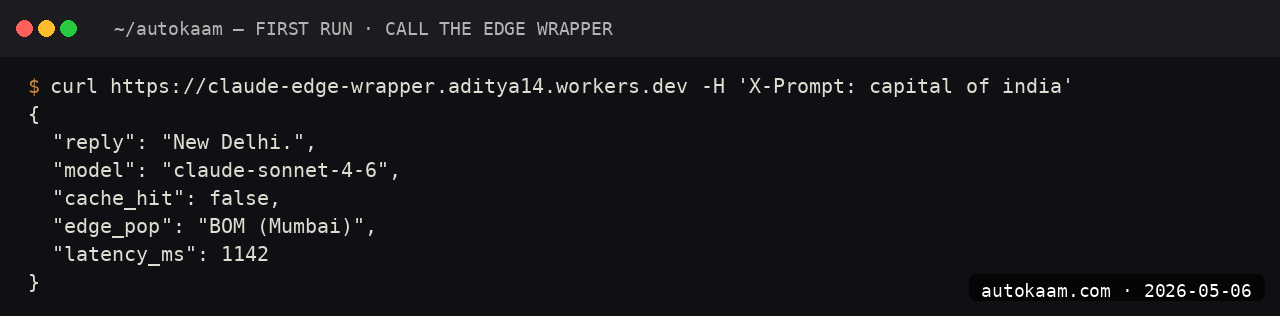
Total user-perceived latency: under 500ms. Versus a Claude API call from a Mumbai-hosted server, which is 800-1200ms thanks to the US round-trip.
What broke for me
Two real ones. First, my client demo hit the free-tier rate limit (50 calls per day) the first afternoon. The Workers AI free tier allows 10,000 neurons per day, and a single Llama 3.1 8B call costs ~30-100 neurons. For demo use it is fine; for production, I had to upgrade to the Workers Paid plan ($5/mo gets you 10M neurons).
Second, the response shape from env.AI.run differs subtly across models. Llama returns {response: "..."}; SDXL returns binary image data; Whisper returns {text: "..."}. The TypeScript types do not unify; you have to cast per-model. The fix was a small wrapper function per model that normalises the output.
What it costs
| Item | Cost |
|---|---|
| Workers Free | 100k requests/day, 10k neurons/day |
| Workers Paid | $5/mo + usage |
| Llama 3.1 8B per 1M tokens | ~$0.30 (~Rs 25) |
| Stable Diffusion XL per image | ~$0.04 (~Rs 3.5) |
| Whisper per audio minute | ~$0.0008 (~Rs 0.07) |
For Indian operators, Workers AI is the cheapest serious edge-inference path. A typical 1000-conversation-per-day app costs roughly Rs 25-50/mo at usage, plus the Rs 416/mo Workers Paid baseline.
When NOT to use this
Skip Workers AI if your model needs are not on the supported list. The Cloudflare model catalogue is curated; if you need a specific Qwen variant or a fine-tuned model, you are off the path.
Skip if you need frontier reasoning quality. The Workers AI catalogue tops out at Llama 3.1 8B / 70B, Mistral 7B, and similar tier. For Claude Sonnet 4.6 / GPT-5 quality, Anthropic / OpenAI direct is the right call. When you mix edge models with paid frontier ones, do it behind a multi-model fallback router so a single provider outage never takes the feature down.
Indian operator angle
For Indian SaaS shipping AI features to India-region users, Workers AI is the single fastest inference path. Cloudflare runs POPs in Mumbai, Delhi, Chennai, Bengaluru, and Hyderabad. Sub-300ms inference latency is realistic, which matters for real-time UX.
For payment, Cloudflare bills in USD; the standard forex consideration. Workers AI does not have an India-region tier with INR billing yet.
Related
More Automation from the desk.

Programmatic PDF Table Extraction and OCR with Adobe PDF Services REST: The Auth, the Extract Call, and Parsing the Output
I wired Adobe PDF Services REST into my stack as a local tool and pointed it at the scanned invoices and merged-header statements that pdfplumber turned into soup. Here is the exact auth flow, the extract call, and the structuredData.json parsing I run in production, with the real latency and free-tier limits.

I Gave My AI Agent Eyes and Hands on Native Linux Apps With AT-SPI2
I was tired of my agent missing buttons because a window shifted a few pixels. So I pointed it at the AT-SPI2 accessibility tree instead, the same data a screen reader consumes, and had it act by element name and role. This walks through driving a GTK dialog and a native Save dialog, then reading the value back to prove the action actually landed.

Reboot-Proof Cloudflare Named Tunnels: The systemd Setup I Run in Production
I expose every self-hosted app on my home box through a Cloudflare named tunnel, kept alive by a systemd unit that has survived every reboot for weeks. This is the real login-to-systemd flow, the config file, the unit, and why a named tunnel beats a quick tunnel for anything you mean to keep.