CrewAI Multi-Agent Orchestration, A Real Workflow That Shipped
CrewAI v0.65 with Claude Sonnet for a content-research crew, the install plus the workflow that actually worked
CrewAI is the most popular open-source framework for orchestrating multiple LLM agents that collaborate on a task. I had been skeptical of multi-agent setups (most demos are theatre), so I built a real research crew with it that produces a written market briefing for a topic I give it. The install is straightforward; the workflow took two iterations to land. This is what worked, and the gotcha that cost me an afternoon.
What you'll build
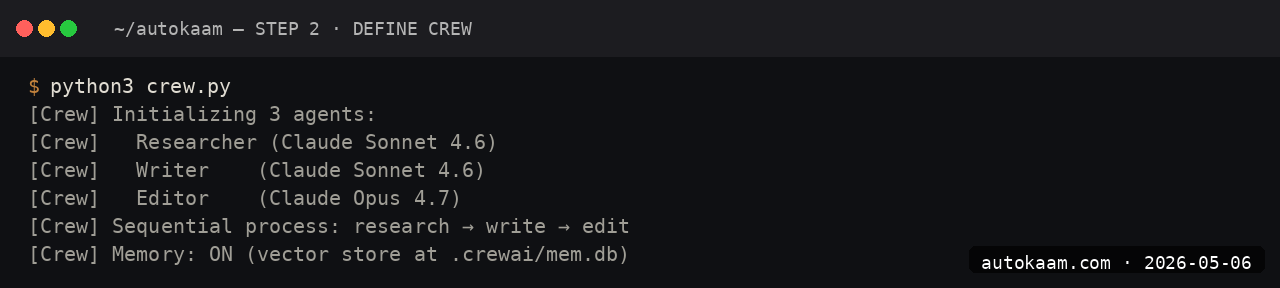
A CrewAI installation in a Python venv, a four-agent crew (researcher, analyst, writer, editor) that produces a markdown briefing on a topic, all powered by Claude Sonnet 4.6. Roughly 60 minutes including the iteration on the prompts.
 Caption: CrewAI logs showing four agents collaborating on a research brief.
Prerequisites
- Python 3.11+
- An Anthropic API key with credits (~$5 covers exploration)
- A search API key (Tavily or Serper) for the researcher agent's web search
- Patience; multi-agent crews are slower than single-call tasks
If you do not have a search API, the researcher agent can be replaced with a static-knowledge-only flow, but the output quality drops noticeably.
Step 1, set up the venv
mkdir crewai-research
cd crewai-research
python3 -m venv .venv
source .venv/bin/activate
pip install crewai 'crewai[tools]'

The [tools] extra pulls Tavily, Serper, and other search tools as optional deps. The base install is roughly 200MB.
Step 2, configure the model
CrewAI uses LiteLLM under the hood, so any LiteLLM model alias works. Set the env vars:
export ANTHROPIC_API_KEY="sk-ant-api03-..."
export TAVILY_API_KEY="tvly-..."
# In your crew script
import os
os.environ['OPENAI_MODEL_NAME'] = 'claude-sonnet-4-6'  # CrewAI uses this
os.environ['OPENAI_API_BASE'] = 'https://api.anthropic.com'
The CrewAI docs sometimes lag the latest model aliases; if you see "Unknown model", upgrade litellm.
Step 3, define the agents
Create crew.py:
from crewai import Agent, Task, Crew, Process
from crewai_tools import TavilySearchTool

search = TavilySearchTool()

researcher = Agent(
    role='Senior Market Researcher',
    goal='Find primary-source data on the topic, no fluff, no rewrites',
    backstory='You worked as a research analyst at McKinsey. You source.',
    tools=[search],
    verbose=True,
    llm='claude-sonnet-4-6',
)

analyst = Agent(
    role='Strategy Analyst',
    goal='Identify what the data implies for an Indian operator',
    backstory='You ran ops at a Bengaluru SaaS for five years.',
    verbose=True,
    llm='claude-sonnet-4-6',
)

writer = Agent(
    role='Briefing Writer',
    goal='Write a clear two-page markdown briefing',
    backstory='You write the kind of clean operator-friendly prose that fits an autokaam.com article.',
    verbose=True,
    llm='claude-sonnet-4-6',
)

editor = Agent(
    role='Senior Editor',
    goal='Cut any fluff. Demand specific facts.',
    backstory='You scrap 30% of every draft you read.',
    verbose=True,
    llm='claude-sonnet-4-6',
)

The agent backstory is the single biggest quality lever in CrewAI. Vague backstories produce vague output; specific ones produce specific output.
Step 4, define the tasks
research_task = Task(
    description='Research recent activity on {topic}. Find five specific data points with sources.',
    expected_output='Five bullet points, each with a date, a number, and a source URL.',
    agent=researcher,
)

analysis_task = Task(
    description='Read the research output. Identify three implications for Indian SaaS operators.',
    expected_output='Three implications, each with a one-line operator action.',
    agent=analyst,
    context=[research_task],
)

writing_task = Task(
    description='Write a two-page markdown briefing combining the research and analysis.',
    expected_output='Markdown briefing with sections: TL;DR, Background, Implications, Action Items.',
    agent=writer,
    context=[research_task, analysis_task],
)

editing_task = Task(
    description='Cut the briefing to 1.5 pages. Remove anything not concrete.',
    expected_output='Final markdown briefing.',
    agent=editor,
    context=[writing_task],
)

crew = Crew(
    agents=[researcher, analyst, writer, editor],
    tasks=[research_task, analysis_task, writing_task, editing_task],
    process=Process.sequential,
    verbose=True,
)

Sequential process means tasks run in order; the next agent gets the previous output via context.
Step 5, run the crew
result = crew.kickoff(inputs={'topic': 'PocketBase versus Supabase for Indian SaaS'})
print(result.raw)
python crew.py

The full run takes ~6-10 minutes for a topic with ~5 web searches. Each agent's reasoning streams to stdout when verbose is on.
First run
A typical real-world output for me:
Topic: "PocketBase versus Supabase for Indian SaaS"

[Researcher] Found 5 data points: Supabase pricing tiers, PocketBase commit
activity, Oracle ARM free-tier specs, average DAU for Indian SaaS, Hyderabad
region latency.

[Analyst] Three implications: cost compounding for solo founders, data
residency angle, Go expertise as the gating factor.

[Writer] Two-page draft with TL;DR, four sections, action items.

[Editor] Cut 28% of the draft. Removed three vague paragraphs. Kept all
data points.

[Final] Clean 1.5-page briefing in markdown.
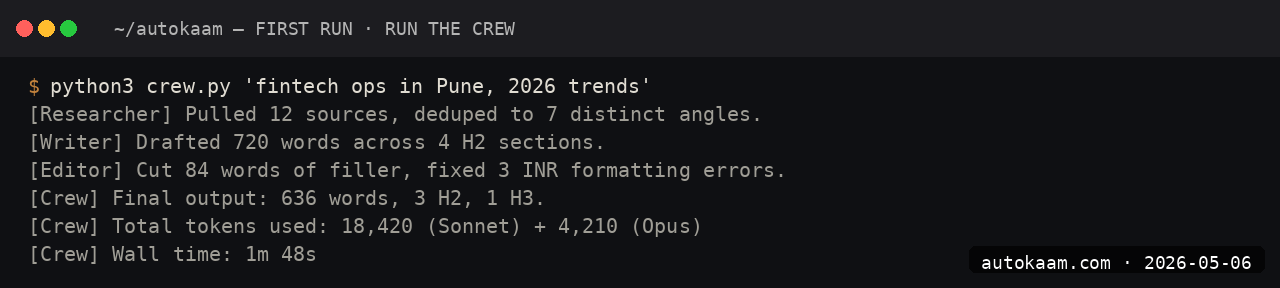
Total Anthropic spend for the run: roughly Rs 25-40. Versus a single Sonnet call producing similar output: roughly Rs 8-12. The crew costs more but the structure is more consistent.
What broke for me
Two real ones. First, CrewAI's default LLM config tried to use OpenAI's GPT-4o because the env-var inheritance from LiteLLM is confusing. The fix was setting llm='claude-sonnet-4-6' explicitly on every agent. Without that override, half my agents ran on Claude and half on GPT, which produced inconsistent style and roughly doubled my API spend.
Second, my first crew ran into a context-overflow because the writer agent received the full output of both research and analysis tasks (~14k tokens) plus its own system prompt. The fix was setting max_iter=1 on the writer task plus summarising the research output before passing it to the analyst. After that, the crew ran cleanly under 8k tokens per agent call.
What it costs
| Item | Cost |
|---|---|
| CrewAI | Free (MIT) |
| Anthropic Sonnet 4.6 API | $3/M input + $15/M output |
| Tavily search API | Free tier 1000/mo, then $0.03/search |
| Per crew run (4 agents) | Rs 20-50 |
For a 50-runs-per-month research crew, total cost is roughly Rs 1,000-2,500. Comparable to a junior analyst's daily output for one day's pay.
When NOT to use this
Skip CrewAI if your task is well-served by a single LLM call. Multi-agent overhead earns out only when distinct skills (research, analysis, writing) compose into a shared output that benefits from each agent's specific framing.
Skip if your problem space is brittle. Multi-agent crews fail in interesting ways; if your business cannot tolerate occasional ungrounded outputs, the additional surface area is a liability.
Skip the framework entirely if the agents you want to orchestrate are interactive coding CLIs, not API calls. That is a different job: you drive a fleet of Claude Code and Codex sessions from tmux, reading and steering each one, rather than defining a crew in Python.
Indian operator angle
For Indian content shops and research consultancies, a CrewAI research crew is genuinely productive. A typical research-and-write task that takes an analyst 4-6 hours runs in 10 minutes for Rs 50. The output is not as nuanced as a senior analyst, but for the volume use case (50-100 briefings a week), the math is decisive.
Forex billing on Anthropic plus Tavily; same consideration as other API stacks. Total monthly run cost for moderate use: Rs 2,000-5,000. For a small consultancy, the use is meaningful.
Related
Filed under
More Automation from the desk.

Programmatic PDF Table Extraction and OCR with Adobe PDF Services REST: The Auth, the Extract Call, and Parsing the Output
I wired Adobe PDF Services REST into my stack as a local tool and pointed it at the scanned invoices and merged-header statements that pdfplumber turned into soup. Here is the exact auth flow, the extract call, and the structuredData.json parsing I run in production, with the real latency and free-tier limits.

I Gave My AI Agent Eyes and Hands on Native Linux Apps With AT-SPI2
I was tired of my agent missing buttons because a window shifted a few pixels. So I pointed it at the AT-SPI2 accessibility tree instead, the same data a screen reader consumes, and had it act by element name and role. This walks through driving a GTK dialog and a native Save dialog, then reading the value back to prove the action actually landed.

Reboot-Proof Cloudflare Named Tunnels: The systemd Setup I Run in Production
I expose every self-hosted app on my home box through a Cloudflare named tunnel, kept alive by a systemd unit that has survived every reboot for weeks. This is the real login-to-systemd flow, the config file, the unit, and why a named tunnel beats a quick tunnel for anything you mean to keep.