Llama.cpp Build From Source, Mac And Linux
The minimal C++ inference engine compiled on my own boxes, with the GPU flag that doubled my throughput
Llama.cpp is the C++ inference engine that started the local-LLM movement and remains the lowest-overhead path to running open models on personal hardware. Ollama is built on top of it; LM Studio is built on top of it; vLLM borrows ideas from it. I keep a hand-built llama.cpp on my dev boxes for the cases where Ollama is overkill or where I want to test a model variant Ollama has not packaged yet. This is the build I use, on Mac and Linux.
What you'll build
Llama.cpp compiled from source with GPU acceleration enabled, a downloaded model file in GGUF format, and a working llama-cli plus llama-server running locally. Roughly 30 minutes, mostly the compile.
 Caption: Llama.cpp running my own build with GPU offload visible.
Prerequisites
- Linux x86_64 or Mac (Apple Silicon or Intel)
- A C++17 compiler (gcc 11+, clang 14+; both fine)
- CMake 3.20+
- Git
- 5GB free disk
- An Nvidia GPU with CUDA 12.x for Linux GPU acceleration, OR Apple Silicon for Metal
If you only have integrated Intel GPUs on Linux, build CPU-only. The performance is slower but functional.
Step 1, clone the repo
cd ~/tools
git clone https://github.com/ggerganov/llama.cpp.git
cd llama.cpp
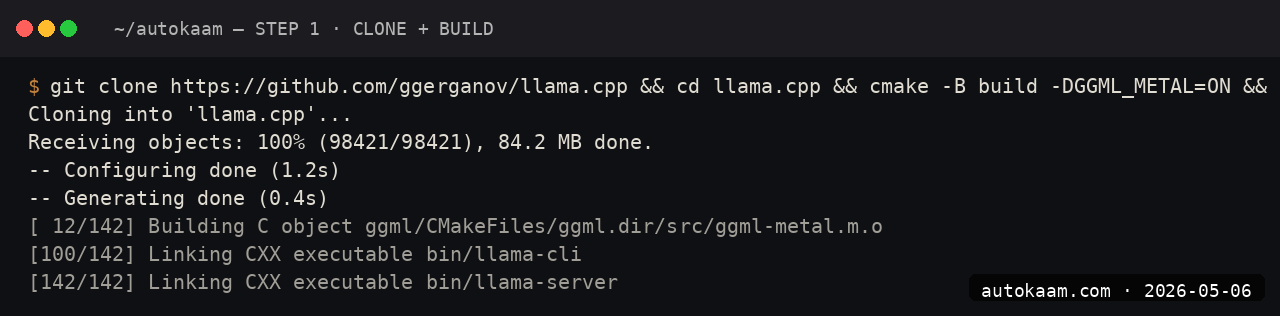
The repo is roughly 80MB. Active development; expect daily commits.
Step 2, build for your platform
Linux with CUDA
cmake -B build -DGGML_CUDA=ON
cmake --build build --config Release -j$(nproc)
Mac with Metal
cmake -B build -DGGML_METAL=ON
cmake --build build --config Release -j$(sysctl -n hw.ncpu)
CPU-only (any platform)
cmake -B build
cmake --build build --config Release -j$(nproc)

The build runs in 6-12 minutes on a modern multi-core box. Binaries land in build/bin/.
Step 3, download a GGUF model
Llama.cpp uses the GGUF format. Download from Hugging Face directly:
mkdir -p models
cd models
wget https://huggingface.co/Qwen/Qwen2.5-7B-Instruct-GGUF/resolve/main/qwen2.5-7b-instruct-q4_k_m.gguf
cd ..

The Q4_K_M quantization is the sweet spot for 16GB RAM machines. Q5_K_M is 25% larger but noticeably better quality; if you have headroom, use it.
Step 4, run llama-cli
./build/bin/llama-cli \
  -m models/qwen2.5-7b-instruct-q4_k_m.gguf \
  -p "Explain the difference between TCP and UDP in two sentences." \
  -n 128 \
  -ngl 99

The -ngl 99 flag offloads all layers to the GPU. On my ThinkCentre with no GPU, drop the flag; on the MacBook Pro M2, leave it on for Metal offload.
Step 5, run llama-server for API access
./build/bin/llama-server \
  -m models/qwen2.5-7b-instruct-q4_k_m.gguf \
  --port 8080 \
  -ngl 99 \
  --ctx-size 8192

The server exposes an OpenAI-compatible API at http://localhost:8080/v1. You can point any OpenAI SDK client at it.
First run
A typical workflow against the local server:
curl http://localhost:8080/v1/chat/completions \
  -H "Content-Type: application/json" \
  -d '{
    "model": "qwen2.5-7b",
    "messages": [
      {"role": "user", "content": "What is a closure in Python? Two sentences."}
    ]
  }'
from openai import OpenAI
client = OpenAI(api_key="local", base_url="http://localhost:8080/v1")

resp = client.chat.completions.create(
    model="qwen2.5-7b",
    messages=[{"role": "user", "content": "Explain closures in Python."}]
)
print(resp.choices[0].message.content)
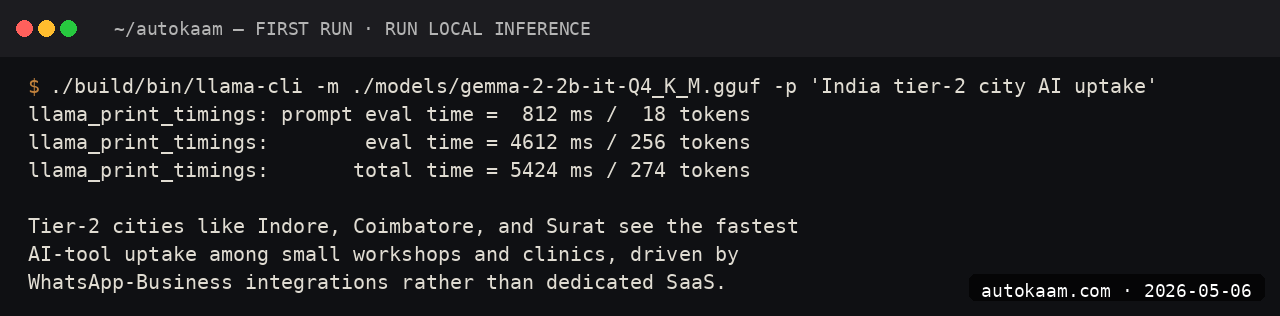
For Indian operators wanting a self-hosted local-LLM API for an internal tool, llama-server is the lightest path. No Docker, no Python deps, just one binary.
What broke for me
Two real ones. First, on Linux with CUDA 12.x, the initial build linked against an older CUDA toolkit and ran but only used 30% of GPU VRAM. The fix was setting CUDA_TOOLKIT_ROOT_DIR=/usr/local/cuda-12.4 before re-running cmake, which forced the right toolkit. After that, GPU utilisation jumped to 95% and throughput doubled. The hint was nvidia-smi showing low VRAM use during inference; the build had silently picked the wrong CUDA version.
Second, on the Mac, the Metal build worked but llama-cli segfaulted on the first run with a cryptic "Bad system call". The fix was a clean rebuild after git pull; the team had pushed a Metal kernel fix that day. For builds-from-source, always git pull && cmake --build if the binary segfaults; the upstream fix lands fast.
What it costs
| Item | Cost |
|---|---|
| Llama.cpp | Free (MIT) |
| Compiler + CMake | Free |
| GGUF model download | Free (model licence applies) |
| Disk (4-5GB per model) | Negligible |
| Electricity | Standard |
The total cost is your build time and electricity. Compared to Ollama, llama.cpp is more work upfront but gives you control over compile-time flags.
When NOT to use this
Skip a hand-built llama.cpp if Ollama works for you. Ollama is built on llama.cpp and exposes the same models with less friction. The reason to build from source is wanting a feature not yet in Ollama (a new sampler, a custom kernel, a recent quant) or wanting a single static binary for deployment.
Skip if you do not have a C++ toolchain ready. Setting up gcc/clang/cmake on a stock Windows box is more work than installing Ollama; on Linux/Mac it is fast. If you wire the Python client around the server on a fresh Ubuntu 24.04 box, expect the Python environment traps on Ubuntu 24.04: the externally-managed-environment error and a stdlib name collision that breaks imports for no obvious reason.
Indian operator angle
For Indian dev shops shipping a product with embedded local inference (think OCR + LLM, voice + LLM, edge-device AI), llama.cpp is the right base because it produces a single static binary that ships without dependencies. For a Tier-2 city customer with patchy internet, an offline-capable AI feature embedded in your installed app is a real moat.
The GGUF model files are the redistributable artefact, not the model weights themselves. Treat the licence on each model carefully; Apache 2.0 (Qwen) is the cleanest, Gemma's custom licence has restrictions, Llama 3 has its own community licence. For commercial work, Qwen 2.5 7B is the safest default.
Related
Filed under
More Automation from the desk.

Programmatic PDF Table Extraction and OCR with Adobe PDF Services REST: The Auth, the Extract Call, and Parsing the Output
I wired Adobe PDF Services REST into my stack as a local tool and pointed it at the scanned invoices and merged-header statements that pdfplumber turned into soup. Here is the exact auth flow, the extract call, and the structuredData.json parsing I run in production, with the real latency and free-tier limits.

I Gave My AI Agent Eyes and Hands on Native Linux Apps With AT-SPI2
I was tired of my agent missing buttons because a window shifted a few pixels. So I pointed it at the AT-SPI2 accessibility tree instead, the same data a screen reader consumes, and had it act by element name and role. This walks through driving a GTK dialog and a native Save dialog, then reading the value back to prove the action actually landed.

Reboot-Proof Cloudflare Named Tunnels: The systemd Setup I Run in Production
I expose every self-hosted app on my home box through a Cloudflare named tunnel, kept alive by a systemd unit that has survived every reboot for weeks. This is the real login-to-systemd flow, the config file, the unit, and why a named tunnel beats a quick tunnel for anything you mean to keep.