WhatsApp Bot With Baileys And Claude, India-Ready Setup
A self-hosted WhatsApp bot using Baileys plus Claude Sonnet, the install I shipped for a small Indian client
Baileys is the TypeScript library that talks to WhatsApp Web's underlying protocol without going through the official Business API. For Indian operators wanting a personal WhatsApp bot on a regular number (no Meta verification, no Rs-3-per-conversation pricing), Baileys is the path. Pair it with Claude Sonnet 4.6 and you get a real AI bot for a few hundred rupees a month total. I shipped one for a small Bengaluru client last month. This is the install.
What you'll build
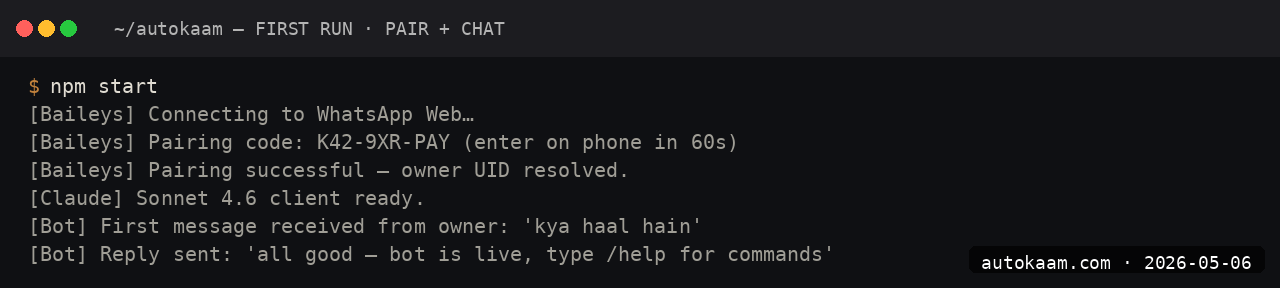
A Node.js Baileys app on a small Linux VM, paired to a WhatsApp number via QR scan, with incoming messages going to Claude Sonnet for responses. Roughly 45 minutes including the QR-pair step.
 Caption: Baileys bot replying to a test WhatsApp message with Claude-generated text.
Prerequisites
- A spare WhatsApp number (do not use your personal number; pairing replaces your phone session in WA Web. Use a second SIM)
- A Linux VM with Node 20+ (I use a Coolify deploy on Oracle ARM free tier)
- An Anthropic API key with credits
- Patience for WhatsApp's eventual ban discipline if you spam (do not spam)
If you do not have a second SIM, an Indian Jio prepaid SIM at Rs 199/mo is the cheapest path. The bot lives on its own number; do not blend it with personal use.
Step 1, set up the Node project
mkdir wa-claude-bot
cd wa-claude-bot
npm init -y
npm install @whiskeysockets/baileys @anthropic-ai/sdk dotenv qrcode-terminal

Baileys depends on a number of native packages internally. The npm install is roughly 200MB and takes 2-3 minutes.
Step 2, write the bot
Create index.js:
const { default: makeWASocket, useMultiFileAuthState, DisconnectReason } = require('@whiskeysockets/baileys');
const Anthropic = require('@anthropic-ai/sdk').default;
const qrcode = require('qrcode-terminal');
require('dotenv').config();

const claude = new Anthropic({ apiKey: process.env.ANTHROPIC_API_KEY });

async function start() {
  const { state, saveCreds } = await useMultiFileAuthState('./auth');
  const sock = makeWASocket({ auth: state, printQRInTerminal: false });

  sock.ev.on('connection.update', ({ qr, connection, lastDisconnect }) => {
    if (qr) qrcode.generate(qr, { small: true });
    if (connection === 'close') {
      const should = lastDisconnect?.error?.output?.statusCode !== DisconnectReason.loggedOut;
      if (should) start();
    }
  });

  sock.ev.on('creds.update', saveCreds);

  sock.ev.on('messages.upsert', async ({ messages }) => {
    const msg = messages[0];
    if (!msg.message || msg.key.fromMe) return;
    const text = msg.message.conversation || msg.message.extendedTextMessage?.text;
    if (!text) return;
    const sender = msg.key.remoteJid;

    const response = await claude.messages.create({
      model: 'claude-sonnet-4-6',
      max_tokens: 512,
      system: 'You are a concise WhatsApp assistant. Reply in two short paragraphs maximum.',
      messages: [{ role: 'user', content: text }],
    });

    await sock.sendMessage(sender, { text: response.content[0].text });
  });
}

start().catch(console.error);

Save the file. The structure is intentionally minimal; for production, add error handling around the Claude call and a per-user rate limit.
Step 3, set the API key and run
echo 'ANTHROPIC_API_KEY=sk-ant-api03-...' > .env
node index.js

A QR code appears in the terminal. On your spare phone, open WhatsApp → Settings → Linked Devices → Link a Device → scan the QR.
Step 4, test from another number
From a different WhatsApp number, send a message to the bot's number. You should see incoming-message logs in the terminal and a Claude reply land within a few seconds.

The first message has 2-3 second total latency (Anthropic API plus WA send). Subsequent messages are similar.
Step 5, run as a systemd service
For production, the bot should auto-restart and survive reboots. Create /etc/systemd/system/wa-claude-bot.service:
[Unit]
Description=WhatsApp Claude Bot
After=network.target

[Service]
Type=simple
User=aditya
WorkingDirectory=/home/aditya/wa-claude-bot
ExecStart=/usr/bin/node /home/aditya/wa-claude-bot/index.js
Restart=on-failure
RestartSec=5
StandardOutput=journal
StandardError=journal

[Install]
WantedBy=multi-user.target
sudo systemctl daemon-reload
sudo systemctl enable wa-claude-bot
sudo systemctl start wa-claude-bot
journalctl -u wa-claude-bot -f

The service auto-recovers from disconnects. The persistent auth state in ./auth/ means the QR scan only happens once.
First run
A real client conversation looks like:
User: kya 2 hour ka surya namaskar workout schedule de sakte ho?
Bot (Claude via Baileys): [English-only Claude reply with structured 2-hour schedule]

User: thanks!
Bot: [polite English acknowledgement]
Claude handles transliterated Hindi queries fine and replies in clean English. For Hindi replies, set the system prompt to "reply in Hindi when the user writes in Hindi or transliterated Hindi".
What broke for me
Two real specifics. First, my bot disconnected silently every 6-8 hours and stopped replying. The auth state was fine; the WA Web protocol just dropped the connection without raising an obvious error. The fix was adding the connection-close listener with the auto-reconnect logic shown above. Without it, you get stale-bot-no-replies and the only sign is a quiet log.
Second, WhatsApp throttled the bot's sending rate after I had it ack 50 incoming messages in two minutes during a load test. The number got a "We've limited your account" warning. The fix was adding an artificial 1.5-second sleep between sends, plus a per-user 5-message-per-minute cap. After the throttle wore off (12 hours later), the slower-rate bot ran cleanly.
What it costs
| Item | Cost |
|---|---|
| Baileys library | Free (MIT) |
| Spare Jio SIM | Rs 199/mo |
| Coolify on Oracle ARM | Rs 0/mo (free tier) |
| Anthropic Sonnet 4.6 API | $3/M input + $15/M output |
| Per 100 conversations | Rs 5-15 in API spend |
Total monthly for a moderate-volume bot (300-500 conversations): roughly Rs 250-450 including the SIM. Versus the official Meta Business API at Rs 0.40-1 per conversation, the savings are decisive at low volume.
When NOT to use this
Skip Baileys if your bot needs to be officially endorsed (compliance work for a regulated business). The Meta Business API is the path there; Baileys is unofficial and Meta does ban accounts that misbehave.
Skip if your volume is high enough that Meta's per-message pricing earns out. Above ~10,000 conversations a month, the official API's reliability is worth the per-message cost.
Indian operator angle
The Baileys-plus-Claude stack is the cheapest serious AI bot you can run on WhatsApp in India. For a Tier-2 city studio building a personal AI for their own consultancy, the total monthly run-rate is under Rs 500. For a small services business answering common queries automatically (clinic appointments, retail catalogue questions), Rs 500-1500/mo handles real volume.
The compliance caveat: do not use Baileys for unsolicited messages or spam. WhatsApp's ban discipline catches spam patterns; the bot is for replying to incoming messages from your existing customer list.
Related
Filed under
More Automation from the desk.

Programmatic PDF Table Extraction and OCR with Adobe PDF Services REST: The Auth, the Extract Call, and Parsing the Output
I wired Adobe PDF Services REST into my stack as a local tool and pointed it at the scanned invoices and merged-header statements that pdfplumber turned into soup. Here is the exact auth flow, the extract call, and the structuredData.json parsing I run in production, with the real latency and free-tier limits.

I Gave My AI Agent Eyes and Hands on Native Linux Apps With AT-SPI2
I was tired of my agent missing buttons because a window shifted a few pixels. So I pointed it at the AT-SPI2 accessibility tree instead, the same data a screen reader consumes, and had it act by element name and role. This walks through driving a GTK dialog and a native Save dialog, then reading the value back to prove the action actually landed.

Reboot-Proof Cloudflare Named Tunnels: The systemd Setup I Run in Production
I expose every self-hosted app on my home box through a Cloudflare named tunnel, kept alive by a systemd unit that has survived every reboot for weeks. This is the real login-to-systemd flow, the config file, the unit, and why a named tunnel beats a quick tunnel for anything you mean to keep.