Aider CLI With Claude Sonnet, A Real Pair-Programming Setup
Aider plus Claude Sonnet 4.6 over the Anthropic API, the install I keep returning to for legacy code
Aider has stayed lean while every other coding agent has bloated. It is a Python CLI that pairs well with one model at a time, edits with a strict diff format, and commits its own changes to git so you can git revert cleanly when the agent gets it wrong. I keep it on every dev box for legacy-code work where Claude Code's planning style is too heavy. With Claude Sonnet 4.6 wired in, it is the cheapest serious coding agent I run.
What you'll build
Aider installed in a Python venv, configured to use Claude Sonnet 4.6 via the Anthropic API, with a small project repo where you can hand it scoped edits. Roughly 15 minutes including the venv setup.
 Caption: Aider editing a Python module with Claude Sonnet 4.6.
Prerequisites
- Python 3.10+ (mine is 3.12.7)
- An Anthropic API key with credits. $5 of credit is enough for a week of normal Aider use.
- A git repo. Aider only operates inside git, no exceptions.
- 200MB free for the install plus model context cache
If you do not have API credits and do not want to buy any, point Aider at a local Ollama instead and the workflow is the same.
Step 1, set up a Python venv
I keep a per-tool venv for Aider so updates do not break my system Python:
mkdir -p ~/tools/aider
cd ~/tools/aider
python3 -m venv .venv
source .venv/bin/activate

The activation prefix (.venv) should appear in your prompt. If you see a system-Python prompt, the activate did not take, check which python.
Step 2, install Aider
pip install aider-chat
aider --version
The install pulls litellm, which is the model-routing layer Aider uses under the hood. Litellm is what gives Aider clean Anthropic, OpenAI, and Ollama support out of the box.
Step 3, set the Anthropic API key
export ANTHROPIC_API_KEY="sk-ant-api03-..."
echo 'export ANTHROPIC_API_KEY="sk-ant-api03-..."' >> ~/.zshrc

The key needs to be in the environment Aider runs in. If you use direnv, put it in the project's .envrc and let direnv load it on cd. Do not commit .envrc to git.
Step 4, run Aider in a project
cd ~/projects/my-app
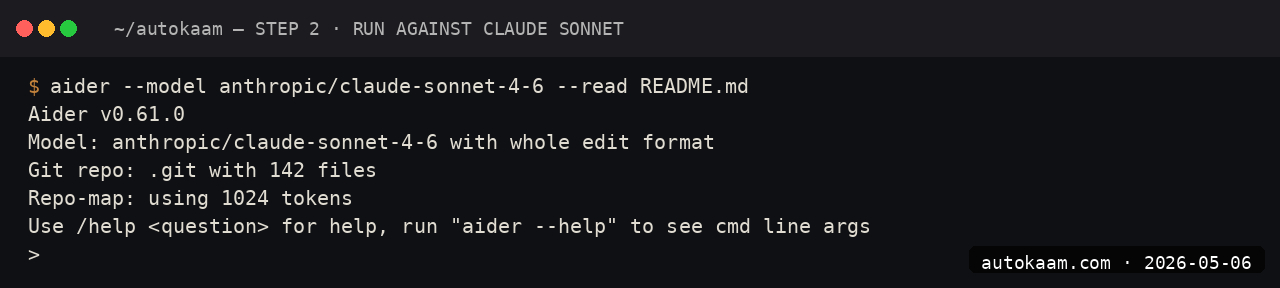
aider --model claude-sonnet-4-6

The first launch reads your git index, prints the working tree summary, and waits for a prompt. Aider does not auto-add files; you tell it which files to edit with /add path/to/file.ts.
Step 5, give it a scoped task
The Aider workflow is "add files, prompt, review diff, accept or reject". A clean test:
> /add src/lib/auth.ts
> the JWT signing function uses HS256 but the verifier is set to RS256, fix the verifier to match HS256 and add a test that round-trips a token

Aider prints the diff, asks for approval. If you approve, it writes the change AND commits it with a descriptive message. The commit is the safety net; if the agent gets the change wrong, git revert HEAD puts you back.
First run
A typical session looks like this end to end:
$ cd ~/projects/my-app
$ aider --model claude-sonnet-4-6

Aider v0.65.0
Model: claude-sonnet-4-6
Repo: ~/projects/my-app

> /add src/components/SearchBox.tsx
Added src/components/SearchBox.tsx to the chat.

> the keyboard shortcut for focus is Cmd+K but on Linux it should be Ctrl+K, detect platform and switch

[Aider proposes a diff]

Apply changes? [Y/n] y

[Commits with: "fix: detect platform for SearchBox keyboard shortcut"]

>
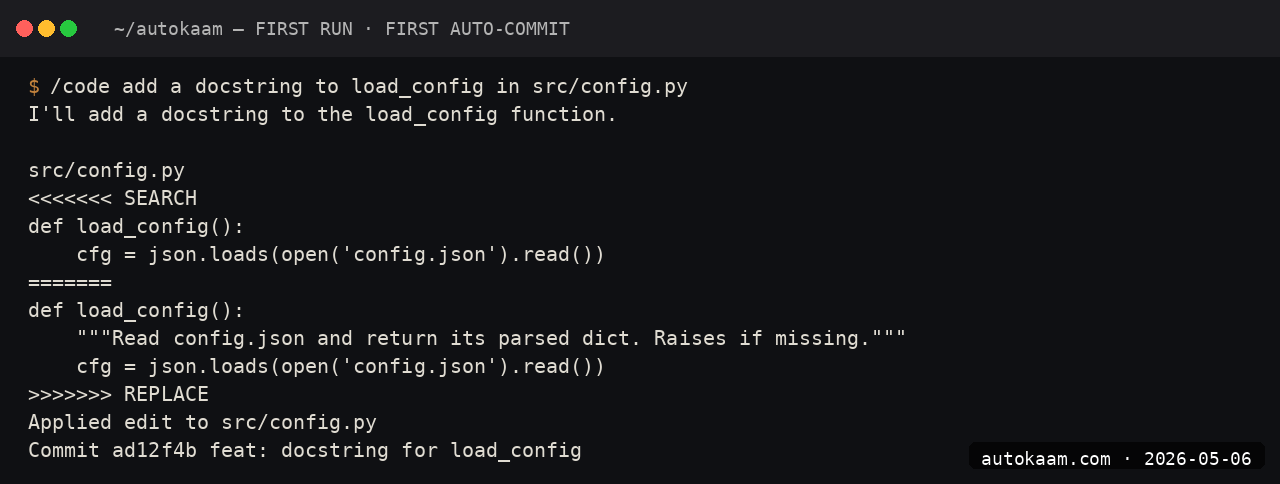
You can keep the conversation going. Aider keeps file context across turns; it only forgets when you /clear.
What broke for me
Two real ones. First, Aider's auto-commit messages are sometimes a paragraph long. On a busy branch this clutters git log. I added --commit-prompt with a short instruction, "Commit messages must be one line, imperative, under 72 chars," and the messages are now sane. Without that flag the model rambles in commit messages because Anthropic Sonnet defaults to verbose explanation.
Second, Aider's --model claude-sonnet-4-6 worked, but --model claude-opus-4-7 failed silently with "Unknown model" until I upgraded litellm. The model alias in litellm lags Anthropic's release schedule by 1-2 weeks. The fix was pip install --upgrade litellm. Once the alias landed, Opus worked. If you see that error, upgrade litellm before debugging Aider.
What it costs
| Item | Cost |
|---|---|
| Aider CLI | Free (Apache 2.0) |
| Python | Free |
| Claude Sonnet 4.6 API | $3/M input + $15/M output |
| Anthropic prompt cache | 1.5x discount on cache hits |
| Local Ollama (alt) | Free |
A normal Aider session for me runs Rs 8-25 per hour against Sonnet, less if the prompt cache hits. Cheap enough that I do not worry about it on a daily basis. If you want to cap spending, set --cost-budget 100 (in cents) per session.
When NOT to use this
Skip Aider if you want an IDE flow with click-to-approve diffs in a sidebar. Cursor or Continue is the right shape for that. Aider is keyboard-only, terminal-only, and the workflow rewards typing precision.
Skip if your work is greenfield architecture. Aider is at its best on existing code, where you can add files and scope the change tightly. For a blank-slate project, Claude Code or Cursor's plan mode is more productive.
Indian operator angle
Anthropic API billing is in USD against your card; same forex consideration as any other Claude tool. INR alternative for the underlying model is none, no Indian provider yet runs Sonnet-class models with API parity.
Where Aider does shine for Indian operators is API frugality. The strict diff format means Aider only sends the touched lines back, not the whole file every turn. On a Sonnet 4.6 plus prompt cache setup, my actual API spend running Aider 4 hours a day is Rs 200-500/mo. Cheaper than a Cursor Pro subscription, and you control the cost ceiling.
Related
Filed under
More AI Coding from the desk.
Next.js Static Export: A Release Preflight for Cloudflare Pages
A durable Next.js static-export preflight: prove the build, enumerate dynamic routes, inspect the rendered head, and audit the exact out/ artefact before a Cloudflare Pages hand-off.
Building a Custom MCP Server in Python: Claude Reaches My Stack
Claude Code is sharp until it hits the edge of your machine and your private tools. I wrote three small MCP servers in Python to close that gap. Here is the real pattern, the real gotcha that bit me, and what it costs.
Claude Code Subagents in Practice: Fork Flag, Cache Leak, Worktree Trap
Claude Code subagents isolate their task contexts. This guide covers the current fork-cache behavior, how to measure a fanout, and the worktree pattern for parallel writers.